Plugins
ggCON supports a plugin system that lets you extend the mod with additional features. Plugins are standalone modules that live in a plugins/ folder alongside the main ggCON DLL and are loaded automatically on startup.
How Plugins Work
Each plugin can:
- Add a panel tab — custom HTML UI that appears as a new tab in the web panel
- Register HTTP routes — add new API endpoints accessible via the ggCON HTTP API
- Register slash commands — add in-game chat commands (e.g.
/starter) that players can use - React to events — respond when players join, leave, or send chat messages
- Execute commands — run admin commands and spawn items through the host API
- Send notifications — deliver chat messages, warnings, and HUD overlays to players
Version Compatibility
Plugins can declare a minimum ggCON version in their metadata. If your installed ggCON version is older than what a plugin requires, the Plugin Manager will show a "Requires vX.Y.Z+" notice and block installation until you update ggCON.
Available Plugins
Loot Drops
Configurable item drop packs with slash commands, per-player allowlists, and claim limits.
- Drop packs — create bundles of items that players can claim with a slash command (e.g.
/starter,/event-drop) - Vehicles in packs — packs can include assembled vehicles alongside items; click + Vehicle in the pack editor to pick from the live vehicle catalog. Vehicle rows show a 🚗 icon and a VEHICLE badge. A quantity above 1 spawns that many separate vehicles
- Stack count — each item has a stack-size field next to quantity. Use it for ammo, cash, and other stackable items so players receive one stack instead of many separate piles
- Per-player limits — set how many times each player can claim a pack (e.g. once per wipe)
- Allowlists — optionally restrict packs to specific Steam IDs
- Expiry dates — set an expiry time after which the pack is no longer claimable
- Panel management — create, edit, enable/disable, and delete packs from the Loot Drops tab in the web panel
- Claim tracking — view all player claims with timestamps; clear claims in bulk (e.g. after a server wipe)
- Category filter — item picker includes a category dropdown to quickly find items by type (Weapons, Ammunition, Food, etc.)
- Smart delivery — items are queued and spawned one per tick to prevent server overload
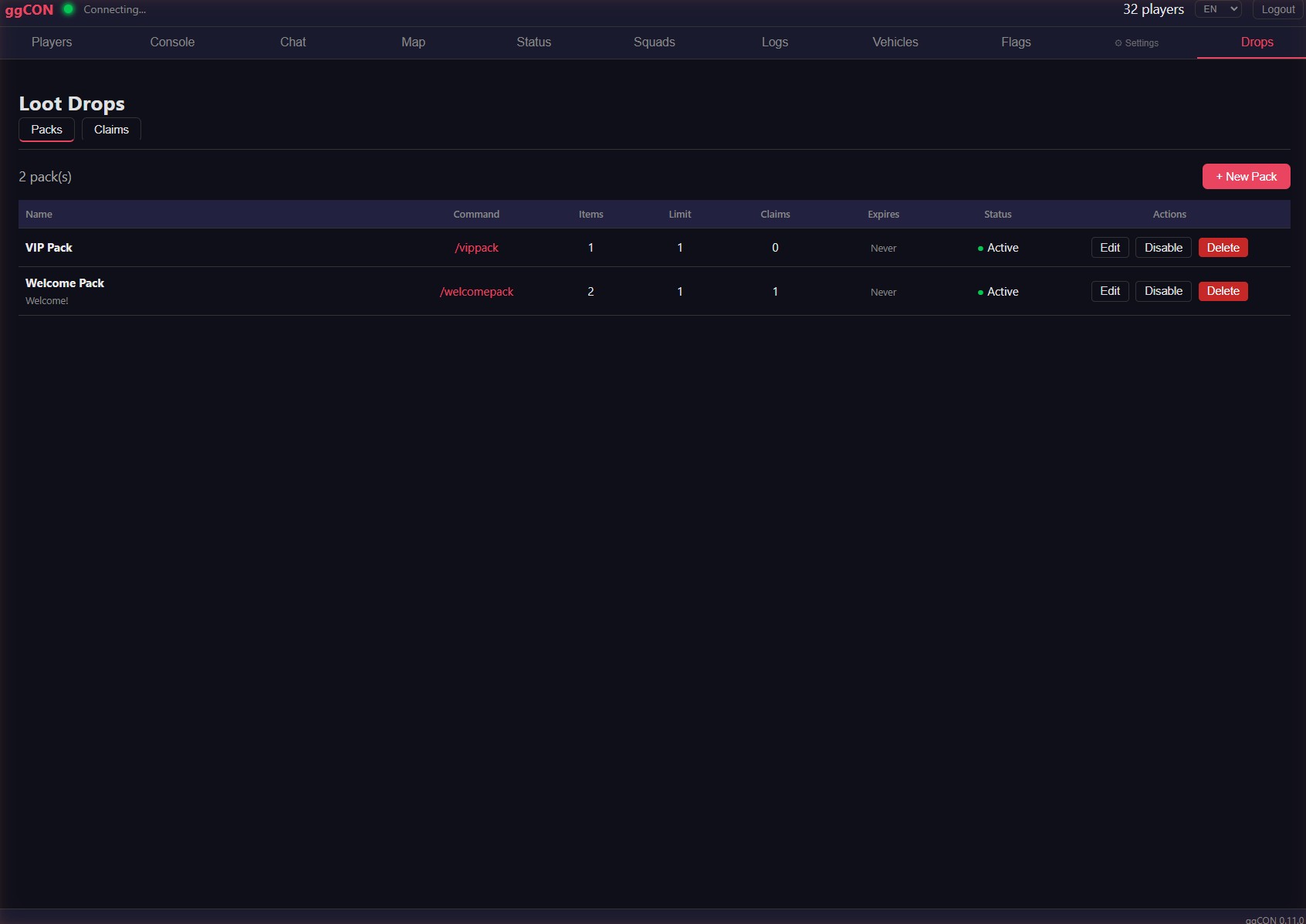
Slash commands: Each pack registers its own command (configurable). Players type the command in chat to claim.
Requires: ggCON v0.11.0+
Log Analyzer
Server performance analytics — replaces the standalone ServerLogAnalyzer desktop tool.
- Analytics tab — 10 interactive time-series charts: FPS, frame time, character count, prisoner count, zombie count, animal count, vehicle count, and more
- Summary cards — at-a-glance stats including average FPS, minimum FPS, peak zombies, peak animals, and sample count
- Time range selector — view data over the last 1 hour, 6 hours, 24 hours, or 7 days
- Load Log button — triggers incremental log read on demand
- Persistent history — up to 7 days of minute-resolution data retained across restarts
It surfaces server performance and entity metrics from SCUM's Global Stats logs on the Analytics panel tab — server FPS history, uptime, entity and vehicle counts, and similar — and replaces the old desktop ServerLogAnalyzer tool. It is read-only monitoring; it makes no changes to your server.
Requires: a recent ggCON build
Kill Feed
Real-time kill event feed for PvP, NPC, trap, and suicide kills, with history, Discord integration, in-game broadcasts, and a leaderboard.
- Kill list — scrollable feed showing killer, victim, weapon, distance, and kill type (PvP, NPC, Trap, Suicide)
- Weapon icons — dynamic icon lookup from the item catalog with a manual fallback table for common weapons
- Detail strip — expanded view of the selected kill event with full player info
- Interactive map — shows killer and victim positions with markers
- LIVE / PAUSED mode — auto-follow new events in LIVE mode, or freeze the list to inspect past events
- History — review past events with a time-window dropdown (Current Session / 24h / 48h / All)
- Multi-select type filters — toggle PvP / NPC / Trap / Suicide independently (e.g. show PvP + Trap, hide NPC); the All chip resets to everything. Your choice is remembered across reloads
- NPC kills — player-vs-NPC kills appear in the feed when the NPC Tracker plugin is installed, with weapon icons and map markers
Discord webhooks
- Post kills to a Discord channel with weapon icons and full kill detail
- Per-type webhooks — route PvP / NPC / Trap / Suicide to separate channels (each falls back to a default URL if left blank), so a PvP-monitoring channel isn't flooded with NPC kills
- PvP delay — optionally hold player-kill posts for a configurable number of minutes (for OPSEC during competitive events); the delay queue survives a server restart
- Map snapshot — optionally include a map image of where the kill happened in the public embed
In-game chat broadcasts
- Announce kills in in-game chat, configured per type (PvP / NPC / Trap / Suicide)
- Editable templates with placeholders
{killer},{victim},{weapon},{distance}, and{category}, plus a color picker - All types disabled by default — opt in per type
Leaderboard
- Leaderboard sub-tab — rank players by PvP kills, PvP deaths, K/D ratio, Armed NPC kills (armed human enemies only — Drifters, Guards; animals, puppets, drones, and sentries are excluded), Animal kills, Puppet kills, trap kills, suicides, longest shot, and favorite weapon. Filter by time window (Current Session / 24h / 7 days / 30 days / All); the top 3 get gold/silver/bronze medals
/leaderboardslash command (alias/top) — players see a quick top-10 in chat. Optional type and window, in any order:/leaderboard [type] [window], where type =pvp(default),armed(Armed NPC;npcalso works),animal, orpuppet, and window =24h,7d(default),30d, orall— e.g./leaderboard armed 30dor/top animal- Scheduled Discord leaderboard — post a leaderboard to Discord on a schedule. You can pick any combination of the PvP, Armed NPC, Animal, and Puppet boards, and each is posted as its own message
The live feed also has a dedicated Animal filter chip, separate from the NPC chip, so animal kills can be shown or hidden on their own.
Requires: ggCON v0.12.8+ (NPC kills require the NPC Tracker plugin)
Trap Feed
Real-time trap event feed showing crafting, arming, disarming, and triggering of traps.
- Event list — scrollable feed of trap events with player name, trap type, and action (Crafted, Armed, Disarmed, Triggered)
- Trap icons — trap-specific icons for each trap type
- Detail strip — expanded view of the selected event
- Interactive map — shows trap locations with markers
- LIVE / PAUSED mode — auto-follow new events or freeze the list
Requires: ggCON v0.12.8+
NPC Tracker
Real-time tracking of every AI character on your server — guards, drifters, zombies, animals, sentries, drones, and Razor.
- Tracked types — guards, drifters, zombies, animals, sentries, drones, and Razor, each shown with its own category color
- Live status — health bars and alive/dead status, updated continuously
- Kill log — records NPC kills, including the weapon used
- Map markers — NPC positions shown on the live map
- Feeds other plugins — NPC kills flow into the Kill Feed, and Quarter Master can award rations per NPC type (see Kill rewards below)
Requires: ggCON v0.12.9+
Quarter Master
A complete in-game economy and player reward system with a web storefront — give your players something to work toward.
Admins build item packages and set prices in Rations, in-game Cash, or both. Players browse and purchase from a web storefront, then claim their items in-game. Combined with GG Coins — a cross-server currency earned by playtime — Quarter Master turns your server's economy into a reason to keep playing.
Admin Panel
The Quarter Master tab in the web panel is where you create and manage everything:
- Packages — bundle any combination of items into purchasable packages; set a name, description, and price in Rations, Cash, or both
- Stack count — each item in a package has a stack-size field, so a single package slot can deliver a full stack (ammo, cash, etc.) instead of many separate piles
- Categories — organize packages into custom categories (e.g., Weapons, Supplies, Gear); categories appear as filter pills in the storefront. Each category has an enable toggle to hide its packages without deleting them
- Discounts — set a percentage discount on any package with an optional expiry date; storefront shows the original price crossed out with a "X% OFF" badge
- Stock limits — cap how many times a package can be purchased; storefront shows "3 left" or "Sold Out" automatically
- Vehicle packages — sell vehicles through the shop; a permanent "Vehicles" category is auto-populated from the game engine's 19 vehicle types; enable individual vehicles and set prices
- Bundle thumbnails — multi-item packages automatically show a representative item icon (you can pick which item is the "lead") and a Bundle badge in the storefront
- Export / import packages — back up your shop or share package templates as a JSON file; import matches categories by name so templates are portable across servers, with auto-rename for conflicts and an import preview
- Open / close controls — open or close the shop (new purchases) and deliveries (stash claims) independently; use them to freeze the shop during events without touching anyone's balances or stash
- Example presets — new installs come with 3 example categories and 5 sample packages to get started quickly
- Economy overview — a sales summary (totals, sales by category, top packages) plus a Player Lookup tool for reviewing transaction history, stash contents, and resolving disputes
- Grant Rations to All — bulk-grant rations to every online player in one click, optionally including offline players who have used the shop before
- Clear All balances — a button on the Economy → Player Balances view sets every player's ration balance to zero, for resetting the shop economy after a server wipe. It requires typing
CLEARto confirm, and GG Coins are never affected
Kill rewards
- Award Rations for PvP kills and NPC kills, with separate amounts per NPC category (Guard, Drifter, Zombie, Animal, Sentry, Drone)
- Per-class overrides — set a custom reward for a specific NPC type (e.g. Razor) that wins over the category default
- Squad-kill penalty — optionally replace the PvP reward with a deduction when killer and victim are in the same squad, to discourage friendly fire (suicides are exempt)
- NPC kill rewards require the NPC Tracker plugin
Player Storefront
Players access their server's storefront at shop.gghost.games, log in with their Steam ID and a one-time PIN (generated by the /shop slash command in-game), and browse available packages.
- Browse and filter — category pills, package cards with item icons, quantity badges, and descriptions
- Purchase flow — select a package, confirm the price, items are added to the player's stash
- Offline purchasing — players can buy packages even when not connected to the server; Ration deductions happen immediately, Cash deductions are queued for next login
- Stash — purchased items are grouped by package in a persistent stash; players click "Claim All" in the storefront when in-game to receive their items
- Cancel & refund — players can cancel a purchased package from their stash while it is still unclaimed and are refunded automatically, in whatever currency they paid (Rations or Cash). An admin Cancellation refund % setting controls how much is returned — the default is a full refund, and you can lower it to charge a restocking fee
- Delivery zones — optionally require players to stand in an admin-configured zone (shop counter, safe room, event point) to claim their stash; configure one or more zones in QM Settings
- Bank Statement — full purchase history with timestamps
- Multi-language — storefront available in English, Chinese, Thai, Russian, German, and Ukrainian; language picker on login and in the header
GG Coins
A global currency earned through playtime across all GG Host servers. The earn rate is the same globally, with special events offering multipliers (e.g. 2x weekend).
- Earn by playing — players automatically earn GG Coins based on time spent online; the rate is the same across all servers
- Earn notifications — optionally show players an in-game notification each time they earn GG Coins from playtime
- Cross-server wallet — GG Coins are stored in a global wallet, not tied to a single server; players who play on multiple GG Host servers accumulate coins across all of them
- Withdraw to Rations — players can convert GG Coins into Rations at an admin-configured exchange rate via the storefront
- Balance display — current GG Coin balance shown in the storefront header with a withdraw button
Delivery Safety
Items never get lost:
- Purchased items go to a persistent stash, not spawned immediately
- If spawning fails (e.g., player logs out mid-delivery), items return to the stash for re-claiming
- Concurrent purchase protection prevents double-charges
- Admin dispute tools: full transaction audit trail and package re-delivery endpoint
Server Directory
The shop.gghost.games landing page lists all servers running Quarter Master. Each card shows the server name, custom shop name, owner welcome message, and GG Coin exchange rate. Offline servers are shown with a status badge. Players can browse servers and jump directly to any storefront.
Slash command: Players type /shop in-game to receive their personal storefront URL with login PIN.
Requires: ggCON v0.12.3+
Taxi Service
A paid teleport service — players spend in-game cash to travel to admin-configured destinations.
/taxi— lists available destinations and their fares;/taxi <name>books a ride;/taxi cancelaborts a pending ride and refunds the fare- Destinations — configure named locations (X/Y/Z) and a fare each, in the Taxi tab
- Anti-escape countdown — a configurable delay runs before the teleport (default 120 seconds; 0–600). The ride cancels and refunds automatically if the player takes damage, dies, or logs out — so the taxi can't be used to escape a PvP fight
- Per-player cooldown — a configurable wait between rides (default 5 minutes)
- Descriptions — give a destination a short blurb that shows on the
/taxilist (e.g.Novice Bay ($0): Safe spawn for newcomers) - Hidden destinations — hide a destination from the
/taxilist while keeping it bookable by its exact name — handy for secret or reward spots - Per-player trip limits — optionally cap how many times each player can ride to a given destination over their lifetime (for example, one free trip to a reward spot); admins can reset trip counts from the panel
- Destination groups — group destinations into clusters.
/taxi <group>sends the player to a random spot in the group, you can enable or disable a whole group in one click (great for event drop-offs), and a group can share a single trip limit - Settings — enable/disable, countdown seconds, cooldown minutes, and a default fare
Available in the plugin marketplace — install it when you're ready to offer paid teleports.
Requires: ggCON v0.12.19+
ggHaul
An admin tool for placing appliances directly in the game world from the new Appliances panel tab.
- Appliances tab — a panel tab that lists every appliance you've placed, with its type, the player it was placed in front of, and its location
- Place in front of a player — pick an online player and the appliance spawns on the ground directly in front of them, facing the player, so you don't have to fiddle with coordinates. Stand where you want it placed, looking at the spot it should occupy, then spawn
- Keep or remove — a freshly spawned appliance is provisional until you press Complete, which makes it permanent (it survives server restarts). Press Delete to remove one. There's no in-world dragging, so to reposition an appliance, delete it and add it again from a better spot
- Persistent — completed appliances are saved and reappear after a server restart
- Appliance types — fridges to start, with more types planned
Use it to furnish trade hubs, safe rooms, and event areas without leaving the panel.
Requires: ggCON v0.13.13+
Player Spawn Plus
Give players a custom gear loadout automatically when they spawn — or apply one by hand from their player card.
- Named loadouts — build any number of loadouts, each with worn clothing/equipment, inventory items, and a held (hands) item. Weapons are delivered to the player's inventory, so make sure the loadout includes enough storage to hold everything
- When loadouts apply — choose any combination of triggers per loadout:
- New player's first deploy — a fresh arrival's first time spawning on your server
- After a character re-roll — re-apply the new-player kit when a player re-rolls their character
- Every respawn — hand out a kit each time a player respawns
- On demand — apply any loadout to a player from their detail card in the panel
- Teleport on spawn — first-deploy and respawn kits can teleport the player to a location you choose before handing over the gear (great for a new-player safe zone)
- Respawn vs. revival — by default the respawn loadout fires only on a genuine respawn, not when a player is revived on the spot (for example with Phoenix Tears), so a revival no longer wipes and replaces their gear. You can turn this distinction off, and set how far a player must move for it to count as a respawn
- Anti-farm cooldowns — separate cooldowns for the respawn and re-roll kits stop players from farming loadouts
- Existing players are spared — when you first enable automatic loadouts, anyone who has already played on your server is treated as an existing player; only brand-new arrivals receive the new-player kit
Server requirement: automatic loadouts require scum.EnableSpawnOnGround=True in your server settings. The plugin's Rules page checks this for you and explains what to change if it isn't set.
Ships disabled by default — turn it on once your loadouts are ready.
Requires: ggCON v0.13.12+
Stash 'n Dash
A contraband dead-drop race — players compete to round up a required item list and deposit it into a hidden drop cabinet before anyone else does.
- Drops (the "quests") — define the item lists players must collect and deposit (e.g. 10× Spliff), each with its own time limit, reward, and weight; enable or disable them individually
- Cabinet sites — place the map locations where drop cabinets can appear; the server rotates cabinets through your enabled sites
- Selection mode — pick the next drop by weighted random or sequential order
- Tunable game — set how many cabinets are live at once, the rotation interval, the deposit range, and the gap between rounds
- First to finish wins — the first player to deposit the full required list into a cabinet wins your configured reward
- In-character whispers — players get status messages in-game, and a
/stashchat command points them toward the current drop - Active Cabinets map view — see every live cabinet on the panel map with one-click teleport
- Panel management — create drops, place sites, and tune settings from the Stash 'n Dash tab; comes pre-loaded with example drops and locations you can edit or replace
Automation: the full game lifecycle — drops, cabinet sites, settings, and start/stop — is also available over the HTTP API, so you can script it from a bot or scheduler.
Ships off until you switch it on.
Requires: ggCON v0.13.15+
Coming Soon
AI NPCs
AI-powered NPC characters that interact with players in chat using an AI model. Replaces the built-in NPC system with a standalone plugin.
- Configure trigger words (e.g.,
@warden) and NPC personalities - NPCs respond to player chat messages with context-aware replies
- NPCs can execute admin commands (with optional per-NPC command allowlists)
- Per-player conversation history
- Configurable model, token limits, and response cooldowns
See NPC System for details on the current built-in version.
Marketplace
The plugin marketplace lets you install, update, and uninstall plugins directly from the web panel — no manual file management needed.
Accessing the Marketplace
- Open the web panel
- Click the gear icon in the navigation bar
- Select Plugins
The marketplace shows all available plugins with their current status:
- Install — download and install a plugin
- Update — update an installed plugin to the latest version (shown when an update is available)
- Uninstall — remove an installed plugin
- Requires vX.Y.Z+ — shown when a plugin needs a newer ggCON version; update ggCON first
Plugin changes take effect on the next server restart.
Plugin Configuration
Plugins can read configuration from ggCON.ini using section headers in the format [Plugin:<id>] (requires a server restart):
Refer to each plugin's documentation for its specific configuration options.