Commands
Commands are sent via POST /command (HTTP) or SERVERDATA_EXECCOMMAND (RCON).
The leading # is optional for ggCON-specific commands but is required for native SCUM admin commands.
How commands are executed
Native SCUM admin commands require at least one player to be online — ggCON runs each command through whichever player is currently available on the server. No dedicated admin account is required; any online player will do, though you can restrict or prefer specific players using the executor selection settings.
This has three important implications:
Commands appear in SCUM's admin log under that player's name. Depending on your executor selection settings, this may be a specific player you've configured or simply whoever happens to be online.
Context-sensitive commands act on the executing player if no target is specified. For example:
This spawns the item on whichever player ggCON is currently running commands through — which may not be who you intended. Always use the targeted form with an explicit Steam ID:
This applies to any command that accepts an optional player argument. When in doubt, check the SCUM admin command reference and always supply the target Steam ID.
The player being used will see the command output in their in-game chat. Any #ListPlayers result, economy query, or automated command output will appear on that player's screen. Enable SuppressCommandOutput to prevent this — it is recommended for most setups.
Restrict the executor
Use RestrictToAdmins and PreferredSteamIDs in the panel's Settings tab to control which player's account commands run under. See Executor selection.
ggCON commands
These commands are handled directly by the mod and do not pass through to the game.
#ListPlayersJson
Returns the live player list as structured JSON — the same response as GET /players.json. Includes rich fields per player: SteamID, location, fame, balance, admin status, gear weight, and more.
Compare with the native #ListPlayers command, which returns plain text lines captured directly from the game:
{
  "ok": true,
  "count": 2,
  "players": [
    {
      "characterName": "ShadowWolf",
      "steamName": "ShadowWolf_99",
      "userId": "76561198011111111",
      "fame": 150,
      "accountBalance": 2400,
      "goldBalance": 5,
      "location": { "x": -145230, "y": 87420, "z": 12300.5 },
      "isAdmin": false,
      "fameLevel": 1,
      "ping": 34,
      "isGodMode": false,
      "isImmortal": false,
      "hasInfiniteAmmo": false,
      "isSuperJumpEnabled": false,
      "gearWeightKg": 12.8,
      "ipAddress": "198.51.100.25",
      "gender": "male",
      "itemInHands": "1H_KitchenKnife_02_Deluxe",
      "velocity": { "x": 293.6, "y": -196.1, "z": 0 },
      "health": 1.0,
      "bodyEffects": [],
      "squad": { "name": "Alpha Squad", "members": 4 },
      "attributes": {
        "strength": 5.0,
        "constitution": 5.0,
        "dexterity": 5.0,
        "intelligence": 5.0
      },
      "skills": [
        { "id": 1, "name": "Rifles", "xp": 450, "level": 2, "levelName": "Medium" }
      ]
    },
    {
      "characterName": "GhostSniper",
      "steamName": "Ghost_Sniper",
      "userId": "76561198033333333",
      "fame": 3200,
      "accountBalance": 15000,
      "goldBalance": 50,
      "location": { "x": -302664, "y": 24774, "z": 35800.8 },
      "isAdmin": true,
      "fameLevel": 4,
      "ping": 12,
      "isGodMode": false,
      "isImmortal": false,
      "hasInfiniteAmmo": false,
      "isSuperJumpEnabled": false,
      "gearWeightKg": 4.64,
      "ipAddress": "203.0.113.42",
      "gender": "female",
      "itemInHands": null,
      "velocity": { "x": 0, "y": 0, "z": 0 },
      "health": 0.85,
      "bodyEffects": [
        { "name": "Exhaustion", "severity": 0, "maxSeverity": 2 }
      ],
      "squad": null,
      "attributes": {
        "strength": 8.0,
        "constitution": 5.0,
        "dexterity": 5.0,
        "intelligence": 5.0
      },
      "skills": [
        { "id": 5, "name": "Sniper Rifles", "xp": 980, "level": 3, "levelName": "Advanced" }
      ]
    }
  ]
}
{
  "ok": true,
  "accepted": true,
  "dispatched": true,
  "command": "#ListPlayers",
  "lines": [
    "\n 1. ShadowWolf\nSteam: ShadowWolf_99 (76561198011111111)\nFame: 150                  \nAccount balance: 2400\nGold balance: 5\nLocation: X=-145230.000 Y=87420.000 Z=12300.500\n",
    "\n 2. NightRaven\nSteam: NightRaven (76561198022222222)\nFame: 820                  \nAccount balance: 0\nGold balance: 0\nLocation: X=56780.000 Y=-33410.000 Z=8900.000\n",
    "\n 3. GhostSniper\nSteam: Ghost_Sniper (76561198033333333)\nFame: 3200                  \nAccount balance: 15000\nGold balance: 50\nLocation: X=-302664.000 Y=24774.000 Z=35800.789\n"
  ]
}
Use #ListPlayersJson when you need structured data for automation. Use #ListPlayers when you want the raw game output.
#ListSpawnedVehiclesJson
Returns the live spawned-vehicle list as structured JSON — the same response as GET /vehicles.json.
#Teleport
Teleports a player to exact world coordinates. ggCON runs this on a fast internal path (sub-second) instead of the slower native dispatch.
| Parameter | Required | Description |
|---|---|---|
X / Y / Z |
Yes | Destination world coordinates |
steamId |
Yes | The target player's 64-bit Steam ID (must be online; quoted or unquoted both work) |
yaw |
No | Facing on arrival: 0 = N, 90 = E, 180 = S, 270 = W |
Example:
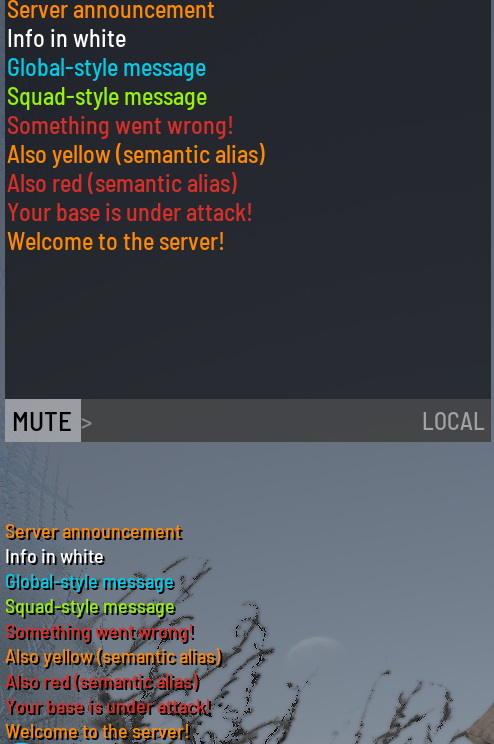
#Broadcast
Sends a message to all players currently on the server.
| Parameter | Required | Description |
|---|---|---|
type |
No | Message color. See Message types. Defaults to Orange (the bright ServerMessage color) |
text |
Yes | Message text |
Omitting the type sends the message as ServerMessage/Orange. Pass Yellow explicitly for the admin-yellow color.
Examples:
#Broadcast Yellow Server announcement
#Broadcast White Info in white
#Broadcast Cyan Global-style message
#Broadcast Green Squad-style message
#Broadcast Red Something went wrong!
#Broadcast Orange Attention-grabbing notice
#Broadcast ServerMessage Same as Orange (semantic alias)
#Broadcast Error Also red (semantic alias)
Response:
Result:
#MessagePlayer
Sends a private message to a single player.
| Parameter | Required | Description |
|---|---|---|
steamId |
Yes | The target player's 64-bit Steam ID |
type |
No | Message color. Defaults to Orange (the bright ServerMessage color) |
text |
Yes | Message text |
Omitting the type sends the message as ServerMessage/Orange. Pass Yellow explicitly for the admin-yellow color.
Examples:
#MessagePlayer 76561198031234567 Red Your base is under attack!
#MessagePlayer 76561198031234567 Yellow Welcome to the server!
Response:
#ExecAs
Dispatches any admin command in the context of a specific player. Use this when a command has no explicit target argument and acts on the executing player by default.
| Parameter | Required | Description |
|---|---|---|
steamId |
Yes | The 64-bit Steam ID of the player to execute the command as |
command |
Yes | Any admin command, including the leading # |
Examples:
#ExecAs 76561198031234567 #SetAttributes 8 5 5 5
#ExecAs 76561198031234567 #SpawnItem Backpack_Tactical_01 1
#ExecAs 76561198031234567 #SetMetabolismSimulationSpeed 10
The target player must be online. If they are not, the command is rejected:
{
  "ok": false,
  "accepted": false,
  "dispatched": false,
  "command": "#ExecAs 76561198031234567 #SetAttributes 8 5 5 5",
  "message": "Target player not online"
}
Note
#ExecAs overrides executor selection settings for the duration of that single command. The target player temporarily becomes the executor, so any command that acts on "the running player" will act on them.
No admin status required
The target player does not need to be an admin or have any elevated permissions. ggCON handles command dispatch internally, bypassing the normal in-game permission checks. Any online player can be used as the executor.
#SetPlayerAttributes
Shorthand for #ExecAs <steamId> #SetAttributes <args>. Sets the physical attributes of a specific player.
| Parameter | Required | Description |
|---|---|---|
steamId |
Yes | The target player's 64-bit Steam ID |
strength |
Yes | Strength value (1–10) |
constitution |
Yes | Constitution value (1–10) |
dexterity |
Yes | Dexterity value (1–10) |
intelligence |
Yes | Intelligence value (1–10) |
Example:
This is exactly equivalent to:
The #SetAttributes command has no Steam ID parameter — it acts on the player running it. #SetPlayerAttributes exists so you don't have to think about that.
#GiveItem
Spawns an item for a specific player. The item appears near the player's location.
| Parameter | Required | Description |
|---|---|---|
steamId |
Yes | The target player's 64-bit Steam ID |
itemName |
Yes | The item class name (e.g., Backpack_Tactical_01, Knife_Hunting) |
quantity |
No | Number of items to spawn (default: 1) |
StackCount <stack> |
No | Stack size per item — use for ammo, cash, and other stackable items so the player gets one stack instead of quantity separate piles |
Examples:
#GiveItem 76561198031234567 Backpack_Tactical_01 1
#GiveItem 76561198031234567 Knife_Hunting 3
#GiveItem 76561198031234567 Ammo_Rifle_556x45_30rnd
#GiveItem 76561198031234567 Magazine_AK15 3 StackCount 30
Stack count
SCUM's native keyword form (StackCount 30) and the positional form (... 3 30) both work. To give 10,000 cash, use quantity 1 with StackCount 10000 rather than quantity 10000.
Response — success:
Response — player offline:
The target player must be online. Use GET /items.json to browse all available item names, or use the web panel's Give Item feature for a searchable UI.
The message field is status text, not a contract
On success the message string is human-readable status text and its exact wording is not stable to string-match against (for example it may read Spawned 1x <item> or Spawned <item>). Integrators should branch on the ok field, not parse message.
No database modifications
Items are spawned directly in the game world near the player. No database changes are made, and the operation works with any item in the game.
#GiveVehicle
Spawns a vehicle near a specific player.
| Parameter | Required | Description |
|---|---|---|
steamId |
Yes | The target player's 64-bit Steam ID |
vehicleClass |
Yes | The vehicle class name (e.g., BPC_Rager, BPC_Barba) |
Example:
Response — success:
Response — player offline:
The target player must be online. Use GET /vehicle-types.json to browse all available vehicle types, or use the web panel's Give Vehicle feature.
#SpawnEntity
Spawns a zombie, animal, armed NPC, Brenner, or Razor near a specific player.
| Parameter | Required | Description |
|---|---|---|
steamId |
Yes | The target player's 64-bit Steam ID |
verb |
Yes | Spawn type: SpawnZombie, SpawnAnimal, SpawnArmedNPC, SpawnBrenner, SpawnRazor |
entityName |
No | Entity variant name. Not needed for SpawnBrenner and SpawnRazor |
Examples:
#SpawnEntity 76561198031234567 SpawnZombie BP_Zombie_Military_Normal_Male
#SpawnEntity 76561198031234567 SpawnAnimal BP_Bear
#SpawnEntity 76561198031234567 SpawnBrenner
Response — success:
{ "ok": true, "message": "Spawned SpawnZombie BP_Zombie_Military_Normal_Male for player 76561198031234567" }
Response — player offline:
The target player must be online. Use the catalog endpoints to browse available entities:
Or use the web panel's Spawn Entities feature for a searchable UI.
#ReloadConfig
Reloads all configuration files (ggCON.ini, ggcon_settings.json, ggcon_password) and re-applies settings without restarting the server.
Response:
The following settings take effect immediately on reload:
- Authentication — password, allowed IPs/CIDRs
- Executor selection —
RestrictToAdmins,PreferredSteamIDs - Command filtering —
LimitAdminCommands,AllowedCommandsFile - Logging —
LogMinSeverity,DiscordLogWebhook,DiscordAuditWebhook
The following settings require a full server restart to change:
Port,BindAddress— HTTP server is already boundRconEnabled,RconPort,RconBindAddress— RCON server is already started or not
#Server
Returns server state as structured JSON — the same response as GET /server.json.
Response:
{
  "ok": true,
  "online": true,
  "modVersion": "0.12.2",
  "modBuild": "2026-04-04 10:15:00",
  "scumVersion": "1.2.2.1.108938+0",
  "onlinePlayers": 3,
  "timeOfDay": 14.5,
  "timezoneOffsetMin": -300,
  "fps": 30.4,
  "avgFps": 30.3,
  "minFps": 28.1
}
#Weather
Returns live weather and environment data as structured JSON — the same response as GET /weather.json.
Response:
{
  "ok": true,
  "timeOfDay": 15.32,
  "sunriseTime": 6,
  "sunsetTime": 21,
  "rainIntensity": 0,
  "snowIntensity": 0,
  "windAzimuth": 307.169,
  "windIntensity": 0.025,
  "windSpeedKph": 5.03,
  "airTemperature": 34.94,
  "waterTemperature": 25,
  "humidity": 0.025,
  "fogDensity": 0.38,
  "lightningRate": 0,
  "nighttimeDarkness": 0,
  "cirrostratusCoverage": 0,
  "cumulonimbusCoverage": 0.12,
  "nimbostratusCoverage": 0
}
Native SCUM admin commands
All other commands are forwarded directly to the SCUM admin command system. Any command that works for an in-game admin will work here.
Examples:
#ListPlayers
#ListSquads
#ListBodyEffects 76561198000000001
#SetFamePoints 76561198000000001 5000
#GiveMoney 76561198000000001 1000
#SpawnItem 76561198000000001 Backpack_Tactical_01 1
#Broadcast Hello from the server!
#SetTime 12 00
Output lines from the game (if any) are returned in the lines array of the response.
#SendNotification
#SendNotification is a developer-level SCUM command. To send on-screen notifications to players, use the web panel or the notification API instead — they're more reliable and offer more options:
- Web panel — the Chat tab sends Warning (center-screen, custom color + duration), Kill Feed (bottom-center banner), or Chat messages, to a single player or everyone. See Web Panel.
- API —
POST /messagewithmethodset towarning,killfeed, orchat(target a player by Steam64 ID, or omit it to send to everyone).
Developer commands
SCUM includes a set of developer-level commands — commands such as #SetAttributes, #SetSkillLevel, #Knockout, #SetImmortality, and #SetMetabolismSimulationSpeed — that are normally restricted to elevated users configured directly in the server database.
ggCON supports these commands out of the box. No database modifications or elevated user configuration is required. Send them the same way as any other admin command:
#SetSkillLevel 76561198000000001 Rifles 3
#ExecAs 76561198000000001 #SetAttributes 8 5 5 5
#Knockout 76561198000000001 10
#SetImmortality 76561198000000001 true
#SetMetabolismSimulationSpeed 10
Note
#SetAttributes has no Steam ID parameter — it acts on the executing player. Use #ExecAs or #SetPlayerAttributes to target a specific player.
Command filtering
If LimitAdminCommands = true is set in your config, only commands listed in ggCON_allowed_commands.txt will be accepted. Commands not in the list are rejected before reaching the game:
{
  "ok": false,
  "accepted": false,
  "dispatched": false,
  "command": "#KickPlayer 76561198000000001",
  "message": "command not in allowed list"
}
See the Config Reference for details.